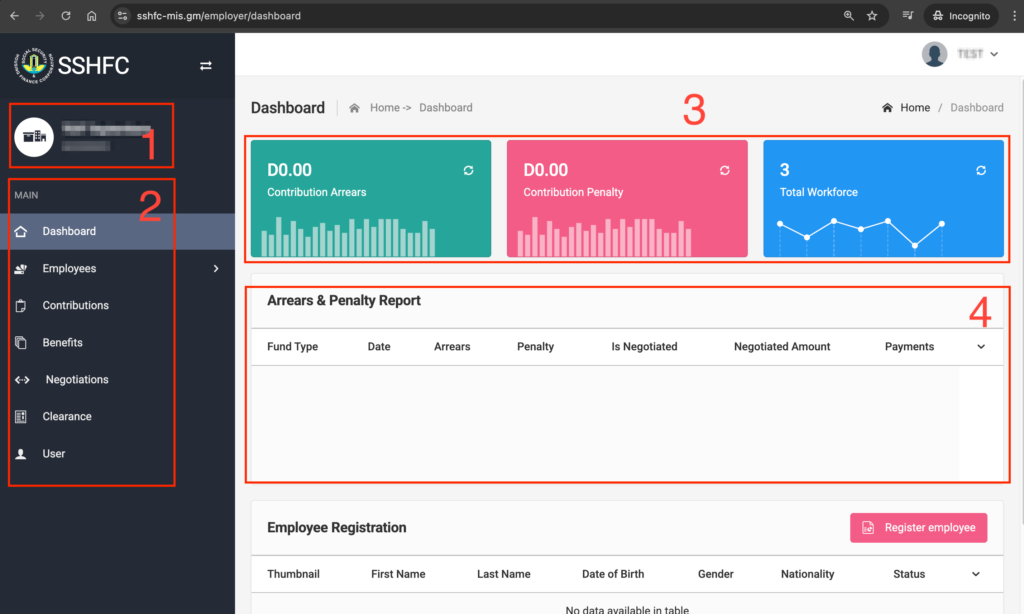
Employer Mini Profile: Here, you’ll see your Employer Name and Registration Number—this confirms the account you’re logged into.
Main Panel: From the main panel, you can perform various activities related to Employees, Contributions, Benefits, Negotiations, Clearance, and Users.
Employer Statistics: This section shows a summary of your employer statistics, including The total Contributions and Penalties owed to SSHFC and the number of active employees registered with SSHFC under your account.
Arrears and Penalty Report: Here, you’ll find a detailed breakdown of any arrears and penalties owed to SSHFC, organized by fund type